Reports and templates
A report is built on the Reporting canvas as a chain of nodes (New Report → Add Heading → Add Value → … → Render PDF) and rebuilt on every run, so it never falls out of step with the calculation. Render PDF typesets it with Typst and a template, which decides how it looks: an engineering report, a journal article, a calculation note.
The tutorial’s chapter A first report builds one and then switches its template (Help › Tutorial).
The templates
Template |
What it is |
Fields it asks for |
|---|---|---|
Report ( |
A numbered A4 report: title block, abstract, sections and lettered appendices |
authors (optional) |
IEEE-style article ( |
Two columns on US letter, Roman-numbered sections, “Fig.” and “TABLE” captions, IEEE-style references, index terms. Written for noodlelab, not IEEE’s official template: check your venue’s instructions |
authors, keywords |
Calculation note ( |
A document number, revision, who prepared, checked and approved it, a revision history, and “sheet n of m” on every page |
doc_number, revision, project, prepared_by, checked_by, approved_by, status, revisions |
Test report ( |
Opens with the verdict and the compliance matrix, then the test article, procedure and details |
test_article, report_number, procedure, facility, tested_by, witness |
One-page summary ( |
The title, abstract, key values, the verdict and the first figure, on one page; everything else is left out |
– |
Slides ( |
A 16:9 deck: a title slide, then a slide for every top-level heading |
– |
Fields in bold are required: Render PDF warns while you edit when one is empty, and the PDF still renders.
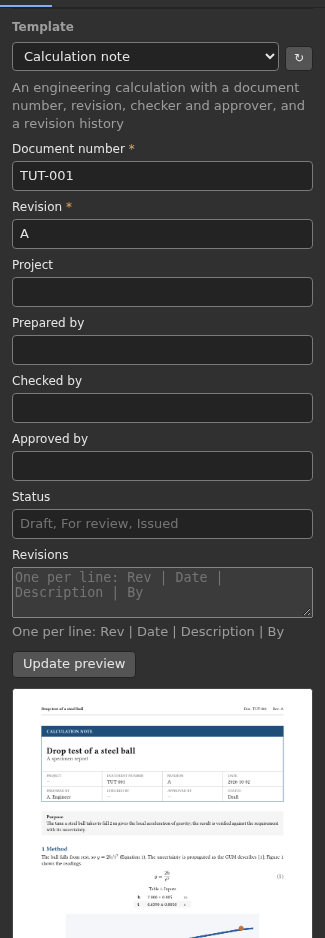
Choosing a template
Select a Render PDF node. The inspector’s Template section has:
a dropdown of every template: noodlelab’s, your plugins’, and your workspace’s (see below);
a form for the fields the chosen template asks for;
Preview: a page of a specimen report in that template, with your fields. The specimen shows every kind of block; your own report appears when the graph runs.
The fields are stored on the node as Template fields, one name: value
per line, so the graph keeps them and a script or an agent can set them too:
doc_number: CN-0042
revision: B
checked_by: A. Person
revisions: A | 2026-09-01 | First issue | NK
revisions: B | 2026-10-01 | Added Monte Carlo | NK
authors: Ada Lovelace; Analytical Society; ada@example.org
authors: Charles Babbage; Analytical Society
A field of kind list (revisions, keywords) takes one value per line, as
does people (authors), whose values are Name; Affiliation; email.
Without authors, templates use New Report’s author line.
Cross-references, citations and concise values
Labels. Add Figure, Add Image, Add Table, Add Key Values and Add Equation take a
label(fig-drag,tab-inputs,eq-period). Text with markup on refers to it as@fig-drag, which becomes “Figure 2” (or “Fig. 2” in the article), numbered by the template.Citations. Add Bibliography reads a BibTeX (
.bib) or Hayagriva (.yml) file and places the reference list where it sits in the chain. Text with markup cites an entry by its key,@gum2008, and the template numbers and styles it (IEEE style in the article). A report without Add Bibliography has no references, and@keyin it is an error.Concise notation. Add Value’s style
concisewrites an uncertain result as journals and CODATA do,9.806(12) m/s²instead of(9.806 ± 0.012) m/s², rounded to two significant digits of the uncertainty as the GUM recommends.
Your own templates
Copy one of noodlelab’s template folders
(src/noodlelab/reports/templates/)
into a templates/ folder in your workspace and change it. It appears in the
dropdown at once (press ↻ next to it); one with the same name as noodlelab’s
replaces it, so a templates/default/ with your letterhead becomes every
report’s look. A template is a folder:
templates/letterhead/
    template.typ      # the Typst file that is compiled
    template.toml     # optional: its title, description and fields
    logo.svg          # anything else it uses
A single templates/memo.typ file is a template too, without fields or assets.
template.toml describes the template and the fields its title block reads:
title = "Calculation note"
description = "A numbered calculation with a revision table"

[[fields]]
name = "doc_number"          # an identifier: what the Template fields line starts with
label = "Document number"    # shown on the form
required = true

[[fields]]
name = "revisions"
kind = "list"                # text (the default), list, date or people
help = "One per line: Rev | Date | Description | By"
template.typ receives the report as JSON and styles it. Every template
can import the blocks every report has from noodlelab.typ, which noodlelab
puts next to it when it compiles, so a template only has to style its pages
and its title block:
#import "noodlelab.typ": *
#let doc = load-doc()

#set page(paper: "a4", margin: 2cm)
#image("logo.svg", width: 3cm)
= #doc.title
Document #field(doc, "doc_number", default: "—")

#render-blocks(doc)
What noodlelab.typ gives a template:
Name |
What it is |
|---|---|
|
The report: |
|
One field’s value |
|
A field as an array (for list and people fields) |
|
The authors’ names |
|
Every block in order. |
|
One block |
|
Whether a block is the compliance matrix (or its summary sentence), which a test report or summary can put first |
|
The pieces the blocks are made of |
Typst reads only the files in the template’s folder: a template cannot reach the rest of the computer.
Plugins can ship templates too, listed in their manifest:
templates = ["reports/datasheet"] # folders (or .typ files) inside the package
See Writing a plugin.
Choosing a template from code
Render PDF’s template and fields are ordinary inputs, so a graph written
as JSON or by an agent sets them like any other value:
{"id": "pdf", "type": "report.render_report",
 "inputs": {"report": {"link": {"node": "value", "output": "result"}},
            "template": {"value": "calc-note"},
            "fields": {"value": "doc_number: CN-0042\nrevision: A"}}}
In Python, noodlelab.reports.render_pdf(doc, path, "ieee-article", root=workspace)
renders a ReportDoc, and noodlelab.reports.find_templates(root) lists the
templates a workspace can use.